My organization
This section covers settings managed by your organization’s admins.

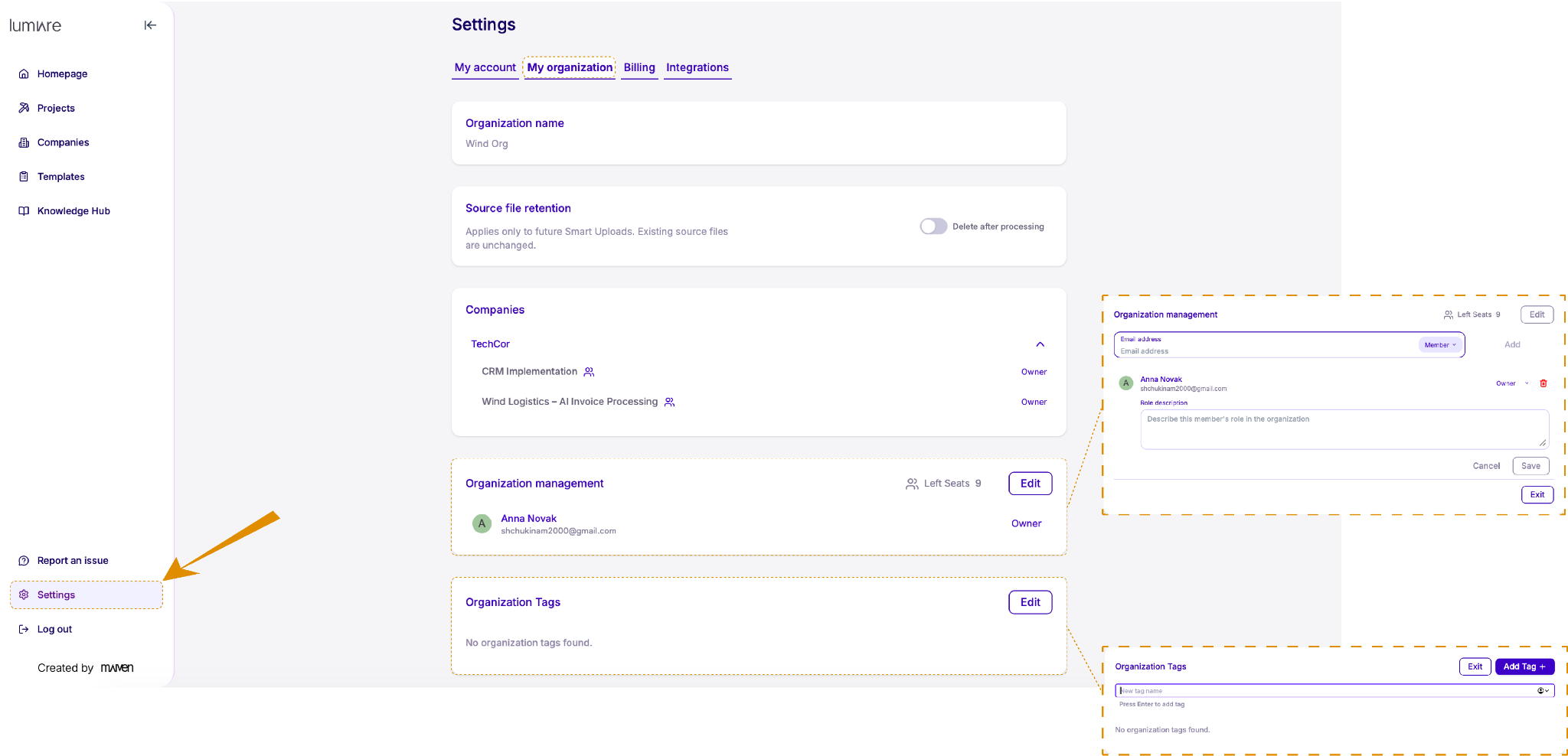
To manage your organization's settings, click Settings in the left sidebar and open the My organization tab.
Source file retention: Turn on Delete after processing if you want uploaded files to be removed once Lumiare has extracted their information. This setting applies only to future Smart Uploads, and files you've already uploaded stay unchanged.
Companies: See all the companies in your organization, along with their projects and your role in each one.

Organization management: See who's part of your organization and how many seats you have left. Click Edit to make changes:
Add members: Enter a colleague's email address, choose their role, and click Add.
Change roles: Use the dropdown next to a member's name to update their role, or click the trash icon to remove them.
Describe roles: Add a short description of each member's role in the organization and click Save. Lumiare uses these descriptions to suggest the right owners when you run AI Actions such as Assign Core Information Data Owners.
Organization tags: Create tags that can be used across all your projects. Click Edit, type a tag name, and press Enter to add it. Click Exit when you're done.